I've been wearing and trying out a LOT of mesh outfits and avatars lately and thought I'd share a few of my experiences, tips and observations.
1. What is mesh?
From the Second Life Wiki: "Mesh is the capability to bring 3D models, known as meshes, created in third-party tools into Second Life."
These mesh models can be applied to prims and form the basis for highly detailed and complex objects such as vehicles, plants, terrain features, etc. They can also be applied to the avatar as clothing or body parts ("rigged mesh"). When rigged mesh is used as body parts, you can create micro avatars (fairies for example) or almost anything conceivable that can move with the "skeleton" of your avatar. Rigged mesh changes your avatar shape (length of "bones") to conform to the mesh sizes rather than letting the Second Life sliders control it. So let's look at a few examples:
 |
| Click to enlarge |
Complete "petite" mesh avatar
On the right is a Micro Pixie avatar from (11)Design. You can see she's fully detailed yet measures only slightly more than 2' tall (.65m). She's anatomically correct and moves just like a normal avatar even being able to use regular dance animations. The pose you see in the photo works as-is.
You should note that there are many creators of petite avatars and that clothing designed to fit one style will probably not fit others unless they conform to the same shape specifications. More on this below!
 |
| Click to enlarge |
Petite avatars are NOT the same as most "tiny" avatars. Tinies are generally made using prims and folding the avatar up into strange contortions. They require special animations for movement such as dancing and sometimes, even walking.
Mesh outfit on full size avatar
To the left we have a mesh outfit from my fave designer, Inga Wind. The outfit, "Nellie", is entirely mesh except for the belt.
If you enlarge the photo you can see that all the folds, creases, hems and cuffs are 3-dimensional and much more realistic than Second Life system clothes or system clothes with prim attachments.
Mesh object
 |
| Mesh penguin near petite fairy |
And finally, we get to the last form of mesh (well there may be others but for all practical purposes), a rezzed object. This adorkable little guy (not so little compared to my petite fairy) is a scripted penguin that flaps his wings and hops around. Very cute. And the neat thing is that his (or her? How do you tell?) body is seamless. No separate prims needed for the arms or feet.
OK so now you see the examples, it's on to the real reasons I'm writing this article.
2. Mesh only works with mesh-enabled viewers
 |
| Phoenix 1.52 pre-mesh viewer |
This may seem obvious to experienced SL users but surprisingly, a lot of people don't realize that to a large portion of the Second Life community still run older viewers. That mesh outfit that looks totally cute to you can make you appear naked wearing only a few blobs or blocks to those on non-mesh-enabled viewers. Here are two examples using the same Inga Wind outfit from above:
 |
| Pre-alpha viewer |
|
As you can see, Snickers looks like she's wearing some large, tasty donuts with blocks on her feet.
Again, unless the VIEWER can render 3D Mesh, this is what the person running that viewer will see. To make matters worse, if it's an even older viewer that doesn't support alpha clothing layers (more on this), you may look completely nakey. So here's a tip. Wear undies if at all possible with your mesh outfit. Sometimes however, the alpha mask will clash with what you wear so this may not be possible. You have been warned (black box applied so as to not frighten small children and tinies).
NOTE -- One common thing I've heard is that "mesh" causes computers to run slowly so people are reluctant to upgrade to a newer viewer that supports mesh. Well, I have news for you. Most of the newer viewers aren't running slowly because they support mesh. It's for a whole slew of reasons like fancy interfaces, multiple attachment points, avatar physics, skinning, etc., etc. Mesh is just one piece of the lag puzzle and, as I point out below, shouldn't be that big a piece. If you want a viewer that supports mesh AND gives great frame rates, I suggest Henri Beuchamp's Cool VL Viewer available here. It's my viewer of choice because I routinely get frame rates of 40 fps vs. Firestorm's 12 - 15. I know it's not approved by Linden Lab but it is TPV-compliant. No guarantees but I think Henri has proven himself fairly trustworthy as a developer.
3. Mesh is NOT flexible
While mesh can conform to and move with your body, it is not independently flexible like a flexi prim. A mesh skirt for example will stretch and move with your legs however it will not flutter, float or respond to wind like a flexi prim.
4. Alpha masks usually required
 |
Alpha mask for Second Life
avatar arms |
You can clearly see the alpha mask for the shorts in the Phoenix 1.52 picture above. Alpha masks, as used in Second Life, are special images (or a special layer embedded in an image) that hide what you don't want to see by making that area transparent. (Some may quibble with my definition but let's keep it simple. Mkay?) Think of them as cutting a hole out of whatever they lie on top of. In the above example, the hole is the shorts. Or as in the example to the left, the arms.
The reason for alpha masks is to hide areas of your body that might poke through the fixed shape of the mesh. Shoes are a great example. With an alpha mask, you can hide the entire foot and recreate it (including cute little toes on peekaboo styles) so it looks much better than a system foot. Or you can simply use the mask to hide selected areas of the body that might conflict with the mesh.
Most outfits are supplied with several alphas -- generally one for the top, one for the bottom and one for both together. That allows you to wear a short set as separates.
5. Picking the right size
Seems like there's always a price to pay for new features. Whether it's slower rendering or increased server load, nothing in Second Life is free. This is true for mesh. One major price you pay is that your avatar now has to conform to the SHAPE of the 3D mesh instead of the other way around. Think of mesh working like a suit of armor. Everything is fixed in size. Your body just sort of rattles around inside of it.
Most mesh outfits come with anywhere from 3 to 6 or 7 sizes. Sometimes they're simply XS, S, M, L, XL while some go further and have multiple sizes along with different body types. First step is to pick the size closest to your avatar's current shape.
6. Adjusting your shape
To really make a mesh outfit work, you must accept what the designer thinks is a good shape which often means tinkering with your own shape to get the best results. If you're wearing a no-mod shape, well, too bad. You may have to switch to one that can be modified.
 |
| Mesh + system top = problem |
Here's an example of an outfit that, out of the box, probably won't fit a lot of female avatars in SL. As you can see, the system top is sticking out OVER the mesh shorts. Not good. It took me awhile to figure out what was going on here and I tracked it down to the tummy slider. Mine is set on 12 (average is probably higher for many). However, this particular outfit was designed with the tummy set to 0. Setting my shape to 0 tummy size cured the overhang.
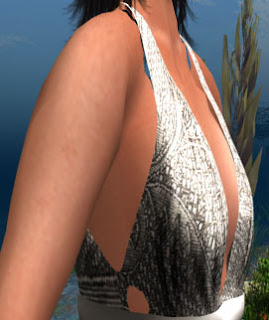
Boobs are harder to deal with. Again, since the mesh top is like armor, whatever shape the mesh designer thinks is right is what you'll get. Those sporting balloons (like what, K cups??) and those (like me) with small ones (maybe B) are going to have problems. Most of the time, the alpha will hide things. BUT, when you combine a system top with the mesh top (as above), the system top will override the alpha and your true shape will poke through. As you can see to the left, this top in Medium size is too small in the waist, a bit too big for the boobies and too long for my torso (the straps float above my shoulders). Something's gotta give and it won't be the mesh top!
Again, this means tweaking it to fit. I have taken to saving a copy of my adjusted shape with the outfit now just to make it easier to wear. A top is to rename your shape to something like "My Shape - MOD for Jackie" or whatever the outfit name is.
As a side note, wouldn't it be nice if Linden Lab would make a slider that would reduce breast "area" to go along with size so smaller breasts wouldn't look big pancakes?
7. The secret behind mesh clothing
OK I hope I don't upset any designers here but let's be honest. MESH clothing is really hard to make!!! I've made several tries at trying to learn Blender and I have to admit defeat. It's just too darn complex. Plus, ideally you want to "bake textures" into the mesh so it looks all nice and shadowed and stuff. UGGGGH!! So what's a fashion designer to do if they aren't 3D inclined?
Templates!
YES, most designers work from full perms templates including my aweseomsauce designer friend, Inga Wind. They take the basic mesh shape and apply their own unique texturing to them. Even so, it's still a crazy amount of work. Instead of just making a top on 2 layers, a bottom on 2 layers and spinning a prim skirt, you have to texture up 6 sizes of tops, 6 sizes of bottoms, plus the usual system tops or other items that you throw in to make a complete outfit. You'll find that most mesh outfits are mashups of original system work by the designer plus the template stuff.
So don't hate on the designer the next time you see her or his work show up with the name of the original template maker. Leave the 3D work to the masters of shaping stuff and let the designers do their thing with the textures. What can blow your brain out is figuring LOD factors, optimizing vertices, fitting the mesh properly, etc., etc. Really, it's OK. Templates are not evil.
Now if you're a designer making your own 3D meshes from scratch, my big floppy sunhat goes off to you.
8. The limitations of mesh avatars
While mesh avas are very cool (and I wuvs my pixies), they also have their limitations in Second life. Here are a few gotchas:
- No expressions or emotions. Mesh avatars have a fixed, often blank look. Mouths don't move, eyebrows don't arch, nuffin'. Some makers offer a HUD that changes out the head mesh for a limited set of expressions, usually no smile, smile and laugh. But it's still static.
- Prim eyeballs required. Yes, it's a bit creepy but they are needed since the alpha hides the system ones.
- Special clothing. You can't wear system clothing at all. You have to wear clothing that is SPECIFICALLY designed to fit the exact shape of the avatar mesh.
- Fixed shapes. You can't adjust them like you can a system shape. In the case of Petites, there are 2 or 3 main competing shapes. Yabusaka / Fallen Gods is by far the most popular. The basic shape is thin and very waif-like. Appropriate for fairies and such but not everyone's cup of tea. Yabusaka released full perms clothing templates that made it much easier for people to make their own clothes for this style.
I think the next most popular is the (11)Design pixie shape (the one shown at the top of the article). This shape is much more curvy and really looks like a normal avatar shrunk to 2 feet. Unfortunately, there hasn't been as much 3rd party clothing design for the pixies although (11)Design has released tools to help. I think the fact that you have to pay for them has made adoption slower. I've seen one other style in-world but I honestly don't know who makes it.
Even though the shapes are fixed, there is still a lot of variation possible with skins, ears, noses, hands, hair, etc. Designers are pretty much free to do what they like as long as they aren't doing something to affect the basic underlying body parts.
- Recovery required. Often, after you wear a mesh avatar, if it has severely deformed you from the normal range of slider available shapes, you can end up looking like this when you try to go back to your normal shape and clothing. Ugggh! Poor Snickers has her feet coming out of her knees and looks all squashed up. :(
 |
| Trying to return to normal |
9. Recovering from a mesh avatar
No I don't mean getting over a breakup with an elfin lover. It means what to do if you end up like this horrible messe to the right!
 |
| Bent knee syndrome |
- Most mesh avatar makers provide an animation that is sort of an undeformer. Most of the time it works. A lot of the time it doesn't. When it doesn't, your knees or arms are often permanently bent. I haven't found anything to cure bent knees except a relog.
- Next up is the "vacant stare". For some reason, wearing the full mesh and the prim eyeballs can leave holes in your head when you go back to your normal skin and shape. Here you can see the hair in the eye socket. Ewwwies! Rebaking, changing eyes, switching sims, etc. -- nothing works to get them back except a relog.
 |
| The Vacant Stare |
- Are you sensing a pattern? When some portion of your body doesn't look right after all that mesh goodness, time to relog.
10. Miscellaneous techie things about mesh
Mesh, as you can see, is hella more complicated than primmy or system stuff. In fact, Linden Lab treats mesh uploads differently from normal textures or scuplties as it takes into account "Land Impact" -- which is how much the mesh will affect server performance. Upload charges are variable based on how much Land Impact the mesh item will have.
So while, for legacy purposes, prims (sculpted or not) have a land impact of "one" per prim, meshes are calculated on the basis of download weight (triangles), physics weight and server weight. Basically, if you rez a mesh something or other on your land, you'll get a sort of conversion from mesh to prims as the value that item has for the purposes of figuring out how many prims you have available. And as Linden Lab continues to say, prim count is really not an accurate indicator of Land Impact anyway.
For the most part, meshies are less intensive both server-side and client-side than their primmy counterparts if optimized and done correctly. This is simply because a mesh object generally requires fewer vertices than its prim or sculpted counterpart to look good.
NOTE - Sculpted prims are really 1024-vertex meshes (32x32) made
from special image files and, by comparison, a regular old torus-shaped
prim is 1000 vertices. Mesh objects are not really restricted in the number of vertices so a single mesh object can offer as much or even more detail as a whole bunch of linked prims that have a much higher Land Impact and take longer to render. For a good article about how mesh compares to sculpties see
https://sites.google.com/site/tradewindsyc/boat-building/mesh-vs-sculpties.
11. The "mesh deformer" project
The holy grail for mesh (as far as avatar clothing is concerned) is to be able to have it conform to your existing shape versus the suit of armor situation we have now.
A third-party crowd-sourced project has developed an alpha-version of a mesh deformer that can be built into the viewer. However, as many have pointed out, even if successful, it may not be allowable under Linden Lab's TOS. Being a viewer-side alteration, the deformed mesh would only look good to the person using the deformer capable viewer. To anyone else, it would look just as it looked out of the box. If you deformed a mesh shirt to fit your smaller body, those without the deformer might see your boobies poking through the mesh and other oddness that would interfere with the "shared user experience".
The real answer would be to incorporate mesh deformer capabilities into the server-side stuff. While Linden Lab has expressed interest in this, as far as I know, there has been no formal adoption of the open-source code. (Most of this info on mesh deforming was gleaned from
Nalate's excellent blog.)
12. "Standard Sizing" for avatars (ADDED)
Thanks to Gwyneth's comment below. Here's a live link to another project to deal with the drawbacks on mesh.
http://darisl.wordpress.com/help/standard-sizing-information/
Basically, it's a set of 5 avatar shapes in so called "Standard-Sizes" that gives mesh designers fixed targets. I'm not sure how well it will work since, looking at the size specs, the "love handle" and "saddle bag" settings seem a bit too large for what I generally see in Second Life. OTOH, a designer who includes those settings in her/his mesh will certainly see them fit avatars with lower numbers. It's just that the the mesh item may end up looking too billowy or fat. Who knows???
Anyways, hope this all helps. If anyone has any more suggestions or corrections, feel free to let me know and I'll continue to update this screed.


